**STRICT FACE LOCK:** Use only the provided facial reference image with absolute precision. Do not alter any facial features, including structure, eyes, nose, lips, jawline, skin tone, beard, hairline, age, or expression. Avoid beautification, smoothing, or AI face regeneration. Retain all authentic skin textures, pores, scars, sweat, and natural asymmetry. The face must remain perfectly identical and instantly recognizable, with zero identity drift or reinterpretation.
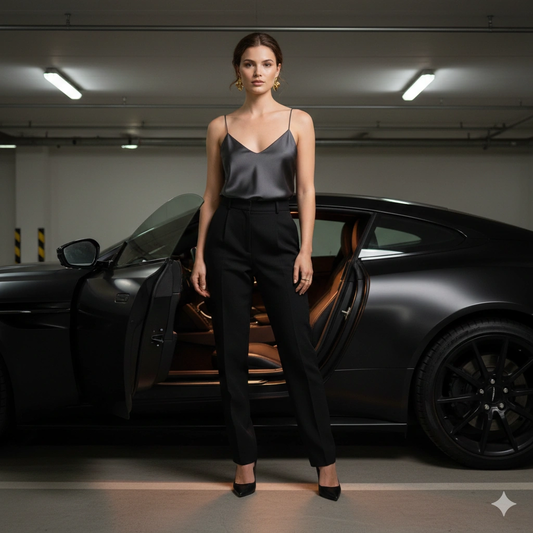
**SUBJECT DESCRIPTION:** Create an ultra-realistic cinematic fashion portrait of a woman standing beside a matte black Aston Martin parked in a private underground garage. Vertical 4:5 composition. Tight medium framing from mid-thigh to just above the head. The car is present but secondary; the subject carries the image. Facial identity must remain 100% locked to the reference image with no modification or enhancement.
**SCENE & ENVIRONMENT:** Concrete garage with low ceilings, clean architectural lines, and subtle strip lighting overhead. The driver door is open and the interior cabin light casts a soft, warm glow onto the seat and pavement. The engine has just been turned off, creating a quiet, still atmosphere. Reflections on the matte black body are soft, controlled, and realistic — never glossy or showroom-like. The environment feels private, architectural, and minimal, emphasizing cinematic realism.
**POSE & EXPRESSION:** She stands just outside the open driver door. One hand rests lightly along the upper door frame. Her body is angled slightly away from the camera, hips turned toward the car, while her head turns back toward the viewer. Chin lowered slightly. Eyes steady, direct, and confident. Expression calm, unreadable, and emotionally controlled. No smile. The pose conveys quiet authority and self-possession.
**WARDROBE & STYLING:** Charcoal silk camisole with a clean neckline and thin straps, softly structured but not loose. High-waisted tailored black trousers with sharp crease lines. Pointed black leather heels. Sculptural gold statement earrings with defined weight and dimensional form. Thin gold rings. No jacket or outerwear.
**HAIR:** Natural hair color preserved exactly as in the reference image. Styled in loose, brushed-back waves with subtle lift at the crown. A few controlled strands near the temples for softness and realism. No dramatic wind or artificial motion.
**LIGHTING:** Low, directional garage lighting creates subtle edge highlights along her shoulders, collarbones, and jawline. The car’s interior light introduces a soft warm accent against the cooler ambient tones of the garage. Balanced exposure with cinematic contrast. No harsh flash. Natural light falloff enhances depth and realism.
**CAMERA & TECHNICAL:** Camera positioned slightly below eye level to create authority without distortion. 50mm to 85mm portrait lens look. Shallow depth of field isolates the subject. Subject critically sharp with ultra-detailed skin texture. The car remains slightly softened but fully recognizable. Realistic optical perspective with professional editorial quality.
**MOOD & CINEMATIC INTENT:** Private moment. Controlled power. Quiet luxury. It feels like a moment after something significant ended, or just before something important begins. Emotional restraint, cinematic stillness, and understated dominance define the frame.
**STYLE & VISUAL TAGS:** Ultra-realistic, cinematic fashion editorial, luxury automotive portrait, underground garage aesthetic, photorealistic skin texture, editorial photography, identity-locked realism, minimalism, cinematic lighting, high-fashion realism, premium portrait photography, strict reference identity preservation, flawless optical realism, vertical 4:5 aspect ratio.